


Updated Jun 07, 2026 Verified Databricks-Certified-Data-Engineer-Professional dumps Q&As - 100% Pass
New 2026 Latest Questions Databricks-Certified-Data-Engineer-Professional Dumps - Use Updated Databricks Exam
NEW QUESTION # 136
The downstream consumers of a Delta Lake table have been complaining about data quality issues impacting performance in their applications. Specifically, they have complained that invalid latitude and longitude values in the activity_details table have been breaking their ability to use other geolocation processes.
A junior engineer has written the following code to add CHECK constraints to the Delta Lake table:
A senior engineer has confirmed the above logic is correct and the valid ranges for latitude and longitude are provided, but the code fails when executed.
Which statement explains the cause of this failure?
- A. The activity details table already contains records; CHECK constraints can only be added prior to inserting values into a table.
- B. The current table schema does not contain the field valid coordinates; schema evolution will need to be enabled before altering the table to add a constraint.
- C. The activity details table already exists; CHECK constraints can only be added during initial table creation.
- D. The activity details table already contains records that violate the constraints; all existing data must pass CHECK constraints in order to add them to an existing table.
- E. Because another team uses this table to support a frequently running application, two-phase locking is preventing the operation from committing.
Answer: D
Explanation:
The failure is that the code to add CHECK constraints to the Delta Lake table fails when executed. The code uses ALTER TABLE ADD CONSTRAINT commands to add two CHECK constraints to a table named activity_details. The first constraint checks if the latitude value is between -90 and 90, and the second constraint checks if the longitude value is between -180 and
180. The cause of this failure is that the activity_details table already contains records that violate these constraints, meaning that they have invalid latitude or longitude values outside of these ranges. When adding CHECK constraints to an existing table, Delta Lake verifies that all existing data satisfies the constraints before adding them to the table. If any record violates the constraints, Delta Lake throws an exception and aborts the operation.
NEW QUESTION # 137
A data engineer is evaluating tools to build a production-grade data pipeline. The team must process change data from cloud object storage, filter out or isolate invalid records, and ensure the timely delivery of clean data to downstream consumers. The team is small, under tight deadlines, and wants to minimize operational overhead while keeping pipelines auditable and maintainable.
Which approach should the data engineer implement?
- A. Implement ingestion using Auto Loader with Structured Streaming, and manage invalid data handling and table updates using checkpointing and merge logic.
- B. Use a hybrid approach: Ingest with Auto Loader into Bronze tables, then process using SQL queries in Databricks Workflows to generate cleaned Silver and Gold tables on a schedule.
- C. Use LDP to build declarative pipelines with Streaming Tables and Materialized Views, leveraging built-in support for data expectations and incremental processing.
- D. Ingest data directly into Delta tables via Spark jobs, apply data quality filters using UDFs, and use LDP for creating Materialized Views.
Answer: C
Explanation:
LDP provides a declarative framework for building production-grade pipelines with minimal operational overhead. Streaming Tables and Materialized Views handle incremental processing automatically, while built-in data expectations allow invalid records to be filtered or isolated in a consistent and auditable way. This approach is well suited for small teams under tight deadlines, as it simplifies maintenance, improves reliability, and ensures timely delivery of clean data to downstream consumers.
NEW QUESTION # 138
A data engineer wants to join a stream of advertisement impressions (when an ad was shown) with another stream of user clicks on advertisements to correlate when impressions led to monetizable clicks.
In the code below, Impressions is a streaming DataFrame with a watermark ("event_time", "10 minutes")
The data engineer notices the query slowing down significantly.
Which solution would improve the performance?
- A. Joining on event time constraint: clickTime == impressionTime using a leftOuter join
- B. Joining on event time constraint: clickTime + 3 hours < impressionTime - 2 hours
- C. Joining on event time constraint: clickTime >= impressionTime - interval 3 hours and removing watermarks
- D. Joining on event time constraint: clickTime >= impressionTime AND clickTime <= impressionTime interval 1 hour
Answer: D
NEW QUESTION # 139
A data engineer deploys a multi-task Databricks job that orchestrates three notebooks. One task intermittently fails with Exit Code 1 but succeeds on retry. The engineer needs to collect detailed logs for the failing attempts, including stdout/stderr and cluster lifecycle context, and share them with the platform team. What steps the data engineer needs to follow using built-in tools?
- A. From the job run details page, export the job's logs or configure log delivery; then retrieve the compute driver logs and event logs from the compute details page to correlate stdout/stderr with cluster events.
- B. Use the notebook interactive debugger to re-run the entire multi-task job, and capture step- through traces for the failing task.
- C. Download worker logs directly from the Spark UI and ignore driver logs, as worker logs contain stdout/stderr for all tasks and cluster events.
- D. Export the notebook run results to HTML; this bundle includes complete stdout, stderr, and cluster event history across all tasks.
Answer: A
Explanation:
The recommended way to troubleshoot and collect detailed job logs is through the Job Run Details page in Databricks. From there, engineers can export run logs or configure automatic log delivery to a storage destination. The driver and event logs available under compute details provide stdout, stderr, and cluster lifecycle context required for root-cause analysis.
NEW QUESTION # 140
A data engineer is tasked with ensuring that a Delta table in Databricks continuously retains deleted files for 15 days (instead of the default 7 days), in order to permanently comply with the organization's data retention policy. Which code snippet correctly sets this retention period for deleted files?
- A. spark.conf.set("spark.databricks.delta.deletedFileRetentionDuration", "15 days")
- B. spark.sql("VACUUM my_table RETAIN 15 HOURS")
- C. spark.sql("ALTER TABLE my_table SET TBLPROPERTIES
('delta.deletedFileRetentionDuration' = 'interval 15 days')") - D. from delta.tables import *
deltaTable = DeltaTable.forPath(spark, "/mnt/data/my_table")
deltaTable.deletedFileRetentionDuration = "interval 15 days"
Answer: C
Explanation:
The deleted file retention period in Delta Lake is controlled by the table property delta.deletedFileRetentionDuration. Setting this property via ALTER TABLE ensures the retention policy is persistently enforced at the table level, extending deleted file retention to 15 days in compliance with organizational requirements.
NEW QUESTION # 141
An upstream system is emitting change data capture (CDC) logs that are being written to a cloud object storage directory. Each record in the log indicates the change type (insert, update, or delete) and the values for each field after the change. The source table has a primary key identified by the field pk_id.
For auditing purposes, the data governance team wishes to maintain a full record of all values that have ever been valid in the source system. For analytical purposes, only the most recent value for each record needs to be recorded. The Databricks job to ingest these records occurs once per hour, but each individual record may have changed multiple times over the course of an hour.
Which solution meets these requirements?
- A. Use merge into to insert, update, or delete the most recent entry for each pk_id into a bronze table, then propagate all changes throughout the system.
- B. Ingest all log information into a bronze table; use merge into to insert, update, or delete the most recent entry for each pk_id into a silver table to recreate the current table state.
- C. Create a separate history table for each pk_id resolve the current state of the table by running a Get Latest & Actual Certified-Data-Engineer-Professional Exam's Question and Answers from union all filtering the history tables for the most recent state.
- D. Use Delta Lake's change data feed to automatically process CDC data from an external system, propagating all changes to all dependent tables in the Lakehouse.
- E. Iterate through an ordered set of changes to the table, applying each in turn; rely on Delta Lake's versioning ability to create an audit log.
Answer: B
Explanation:
CDF captures changes only from a Delta table and is only forward-looking once enabled. The CDC logs are writing to object storage. So you would need to ingestion those and merge into downstream tables.
NEW QUESTION # 142
A junior data engineer is working to implement logic for a Lakehouse table named silver_device_recordings. The source data contains 100 unique fields in a highly nested JSON structure.
The silver_device_recordings table will be used downstream for highly selective joins on a number of fields, and will also be leveraged by the machine learning team to filter on a handful of relevant fields, in total, 15 fields have been identified that will often be used for filter and join logic.
The data engineer is trying to determine the best approach for dealing with these nested fields before declaring the table schema.
Which of the following accurately presents information about Delta Lake and Databricks that may Impact their decision-making process?
- A. Schema inference and evolution on Databricks ensure that inferred types will always accurately match the data types used by downstream systems.
- B. Because Delta Lake uses Parquet for data storage, Dremel encoding information for nesting can be directly referenced by the Delta transaction log.
- C. Tungsten encoding used by Databricks is optimized for storing string data: newly-added native support for querying JSON strings means that string types are always most efficient.
- D. By default Delta Lake collects statistics on the first 32 columns in a table; these statistics are leveraged for data skipping when executing selective queries.
Answer: D
Explanation:
Delta Lake, built on top of Parquet, enhances query performance through data skipping, which is based on the statistics collected for each file in a table. For tables with a large number of columns, Delta Lake by default collects and stores statistics only for the first 32 columns. These statistics include min/max values and null counts, which are used to optimize query execution by skipping irrelevant data files. When dealing with highly nested JSON structures, understanding this behavior is crucial for schema design, especially when determining which fields should be flattened or prioritized in the table structure to leverage data skipping efficiently for performance optimization.
NEW QUESTION # 143
The view updates represents an incremental batch of all newly ingested data to be inserted or Get Latest & Actual Certified-Data-Engineer-Professional Exam's Question and Answers from updated in the customers table.
The following logic is used to process these records.
MERGE INTO customers
USING (
SELECT updates.customer_id as merge_ey, updates .*
FROM updates
UNION ALL
SELECT NULL as merge_key, updates .*
FROM updates JOIN customers
ON updates.customer_id = customers.customer_id
WHERE customers.current = true AND updates.address <> customers.address ) staged_updates ON customers.customer_id = mergekey WHEN MATCHED AND customers. current = true AND customers.address <> staged_updates.address THEN UPDATE SET current = false, end_date = staged_updates.effective_date WHEN NOT MATCHED THEN INSERT (customer_id, address, current, effective_date, end_date) VALUES (staged_updates.customer_id, staged_updates.address, true, staged_updates.effective_date, null) Which statement describes this implementation?
- A. The customers table is implemented as a Type 2 table; old values are overwritten and new customers are appended.
- B. The customers table is implemented as a Type 1 table; old values are overwritten by new values and no history is maintained.
- C. The customers table is implemented as a Type 0 table; all writes are append only with no changes to existing values.
- D. The customers table is implemented as a Type 2 table; old values are maintained but marked as no longer current and new values are inserted.
Answer: D
Explanation:
The provided MERGE statement is a classic implementation of a Type 2 SCD in a data warehousing context. In this approach, historical data is preserved by keeping old records (marking them as not current) and adding new records for changes. Specifically, when a match is found and there's a change in the address, the existing record in the customers table is updated to mark it as no longer current (current = false), and an end date is assigned (end_date = staged_updates.effective_date). A new record for the customer is then inserted with the updated information, marked as current. This method ensures that the full history of changes to customer information is maintained in the table, allowing for time-based analysis of customer data.
NEW QUESTION # 144
A Delta Lake table was created with the below query:
Get Latest & Actual Certified-Data-Engineer-Professional Exam's Question and Answers from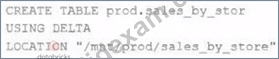
Realizing that the original query had a typographical error, the below code was executed:
ALTER TABLE prod.sales_by_stor RENAME TO prod.sales_by_store
Which result will occur after running the second command?
- A. The table reference in the metastore is updated and no data is changed.
- B. The table reference in the metastore is updated and all data files are moved.
- C. The table name change is recorded in the Delta transaction log.
- D. A new Delta transaction log Is created for the renamed table.
- E. All related files and metadata are dropped and recreated in a single ACID transaction.
Answer: A
Explanation:
The query uses the CREATE TABLE USING DELTA syntax to create a Delta Lake table from an existing Parquet file stored in DBFS. The query also uses the LOCATION keyword to specify the path to the Parquet file as /mnt/finance_eda_bucket/tx_sales.parquet. By using the LOCATION keyword, the query creates an external table, which is a table that is stored outside of the default warehouse directory and whose metadata is not managed by Databricks. An external table can be created from an existing directory in a cloud storage system, such as DBFS or S3, that contains data files in a supported format, such as Parquet or CSV.
The result that will occur after running the second command is that the table reference in the metastore is updated and no data is changed. The metastore is a service that stores metadata about tables, such as their schema, location, properties, and partitions. The metastore allows users to access tables using SQL commands or Spark APIs without knowing their physical location or format. When renaming an external table using the ALTER TABLE RENAME TO command, only the table reference in the metastore is updated with the new name; no data files or directories are moved or changed in the storage system. The table will still point to the same location and use the same format as before. However, if renaming a managed table, which is a table whose metadata and data are both managed by Databricks, both the table reference in the metastore and the data files in the default warehouse directory are moved and renamed accordingly.
NEW QUESTION # 145
A data engineer, User A, has promoted a new pipeline to production by using the REST API to programmatically create several jobs. A DevOps engineer, User B, has configured an external orchestration tool to trigger job runs through the REST API. Both users authorized the REST API calls using their personal access tokens.
Which statement describes the contents of the workspace audit logs concerning these events?
- A. Because User B last configured the jobs, their identity will be associated with both the job creation events and the job run events.
- B. Because the REST API was used for job creation and triggering runs, a Service Principal will be automatically used to identity these events.
- C. Because the REST API was used for job creation and triggering runs, user identity will not be captured in the audit logs.
- D. Because these events are managed separately, User A will have their identity associated with the job creation events and User B will have their identity associated with the job run events.
- E. Because User A created the jobs, their identity will be associated with both the job creation events and the job run events.
Answer: D
Explanation:
The events are that a data engineer, User A, has promoted a new pipeline to production by using the REST API to programmatically create several jobs, and a DevOps engineer, User B, has configured an external orchestration tool to trigger job runs through the REST API. Both users authorized the REST API calls using their personal access tokens. The workspace audit logs are logs that record user activities in a Databricks workspace, such as creating, updating, or deleting objects like clusters, jobs, notebooks, or tables. The workspace audit logs also capture the identity of the user who performed each activity, as well as the time and details of the activity.
Because these events are managed separately, User A will have their identity associated with the job creation events and User B will have their identity associated with the job run events in the workspace audit logs.
NEW QUESTION # 146
A production cluster has 3 executor nodes and uses the same virtual machine type for the driver and executor.
When evaluating the Ganglia Metrics for this cluster, which indicator would signal a bottleneck caused by code executing on the driver?
- A. Total Disk Space remains constant
- B. Network I/O never spikes
- C. The five Minute Load Average remains consistent/flat
- D. Bytes Received never exceeds 80 million bytes per second
- E. Overall cluster CPU utilization is around 25%
Answer: E
Explanation:
This is the correct answer because it indicates a bottleneck caused by code executing on the driver. A bottleneck is a situation where the performance or capacity of a system is limited by a single component or resource. A bottleneck can cause slow execution, high latency, or low throughput. A production cluster has 3 executor nodes and uses the same virtual machine type for the driver and executor. When evaluating the Ganglia Metrics for this cluster, one can look for indicators that show how the cluster resources are being utilized, such as CPU, memory, disk, or network. If the overall cluster CPU utilization is around 25%, it means that only one out of the four nodes (driver + 3 executors) is using its full CPU capacity, while the other three nodes are idle or underutilized. This suggests that the code executing on the driver is taking too long or consuming too much CPU resources, preventing the executors from receiving tasks or data to process. This can happen when the code has driver-side operations that are not parallelized or distributed, such as collecting large amounts of data to the driver, performing complex calculations on the driver, or using non-Spark libraries on the driver.
NEW QUESTION # 147
Which distribution does Databricks support for installing custom Python code packages?
- A. jars
- B. CRAM
- C. CRAN
- D. Wheels
- E. sbt
- F. nom
Answer: F
Explanation:
Get Latest & Actual Certified-Data-Engineer-Professional Exam's Question and Answers from Explanation:
https://learn.microsoft.com/en-us/azure/databricks/workflows/jobs/how-to/use-python-wheels-in- workflows
NEW QUESTION # 148
A facilities-monitoring team is building a near-real-time PowerBI dashboard off the Delta table device_readings:
Columns:
device_id (STRING, unique sensor ID)
event_ts (TIMESTAMP, ingestion timestamp UTC)
temperature_c (DOUBLE, temperature in °C)
Requirement:
For each sensor, generate one row per non-overlapping 5-minute
interval, offset by 2 minutes (e.g., 00:02-00:07, 00:07-00:12, ...).
Each row must include interval start, interval end, and average
temperature in that slice.
Downstream BI tools (e.g., Power BI) must use the interval timestamps
to plot time-series bars.
- A. SELECT device_id,
window.start AS bucket_start,
window.end AS bucket_end,
AVG(temperature_c) AS avg_temp_5m
FROM device_readings
GROUP BY device_id, window(event_ts, '5 minutes', '5 minutes', '2 minutes') ORDER BY device_id, bucket_start; - B. SELECT device_id,
date_trunc('minute', event_ts - INTERVAL 2 MINUTES) + INTERVAL 2 MINUTES AS bucket_start, date_trunc('minute', event_ts - INTERVAL 2 MINUTES) + INTERVAL 7 MINUTES AS bucket_end, AVG(temperature_c) AS avg_temp_5m FROM device_readings GROUP BY device_id, date_trunc('minute', event_ts - INTERVAL 2 MINUTES) ORDER BY device_id, bucket_start; - C. SELECT device_id,
event_ts,
AVG(temperature_c) OVER (
PARTITION BY device_id
ORDER BY event_ts
RANGE BETWEEN INTERVAL 5 MINUTES PRECEDING AND CURRENT ROW
) AS avg_temp_5m
FROM device_readings
WINDOW w AS (window(event_ts, '5 minutes', '2 minutes')); - D. WITH buckets AS (
SELECT device_id,
window(event_ts, '5 minutes', '2 minutes', '5 minutes') AS win,
temperature_c
FROM device_readings
)
SELECT device_id,
win.start AS bucket_start,
win.end AS bucket_end,
AVG(temperature_c) AS avg_temp_5m
FROM buckets
GROUP BY device_id, win
ORDER BY device_id, bucket_start;
Answer: D
Explanation:
The correct way to satisfy non-overlapping windows with an offset in Databricks SQL is to use the window function with three parameters: window duration, slide duration, and start offset.
In option A, the function call:
window(event_ts, '5 minutes', '2 minutes', '5 minutes')
creates 5-minute windows that slide every 5 minutes, with a 2-minute offset, which exactly matches the requirement (intervals like 00:02?0:07, 00:07?0:12, ...).
NEW QUESTION # 149
Assuming that the Databricks CLI has been installed and configured correctly, which Databricks CLI command can be used to upload a custom Python Wheel to object storage mounted with the DBFS for use with a production job?
- A. fs
- B. jobs
- C. configure
- D. workspace
- E. libraries
Answer: A
Explanation:
https://docs.databricks.com/en/archive/dev-tools/cli/dbfs-cli.html
NEW QUESTION # 150
A security team wants to enforce data protection for a customer table containing customer PII data. To comply with local policies, sales team members should only see customers from their region, while non-admin users should have email addresses masked. Which implementation approach should be used when using Unity Catalog row filters and column masks?
- A. Create SQL UDFs for row filtering based on user region and column masking based on group membership, then apply them using ALTER TABLE SET ROW FILTER and ALTER COLUMN SET MASK commands.
- B. Create a view with dynamic WHERE clauses for region filtering and use string replacement functions for email masking using ALTER COLUMN SET MASK command.
- C. Implement row filters with SQL UDFs based on user region only since column masks cannot be combined with row filters on the same table, then apply them be recreating the table with DROP TABLE and CREATE TABLE SET ROW FILTER commands.
- D. Use table ACLs to restrict access using tags with GRANT SELECT ON table_name WITH TAG command, and rely on application-level filtering for sensitive data based on user region.
Answer: A
Explanation:
Unity Catalog enforces fine-grained access control by applying SQL UDF-based row filters and column masks directly at the table level. Row filter UDFs can restrict visible rows based on the user's region, while column mask UDFs can dynamically mask sensitive fields like email addresses for non-admin users. Applying them with ALTER TABLE SET ROW FILTER and ALTER COLUMN SET MASK ensures centralized, consistent enforcement of data protection policies across all access paths.
NEW QUESTION # 151
......
Latest Databricks-Certified-Data-Engineer-Professional Exam Dumps Databricks Exam from Training: https://www.validexam.com/Databricks-Certified-Data-Engineer-Professional-latest-dumps.html